


InTown
4.613.00 Reviews
App Specs
- Version
- 25.52.16
- Updated On
- License
- Free
- Downloads
- 10,000+
- Developer
- LifeAgents
- Categories
- News & Magazines
- Platform
- Android
Screenshots
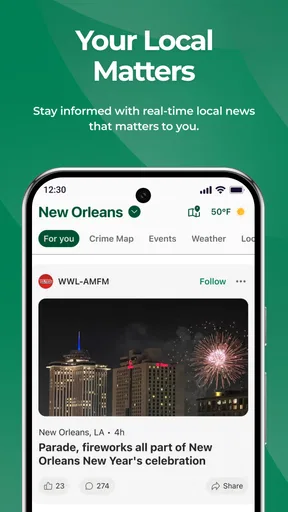
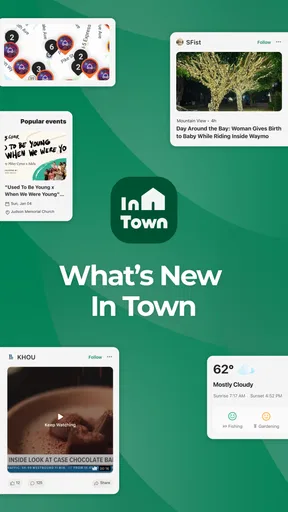
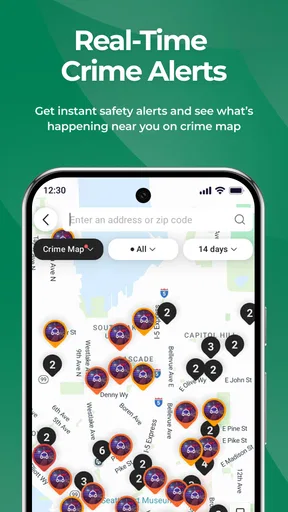
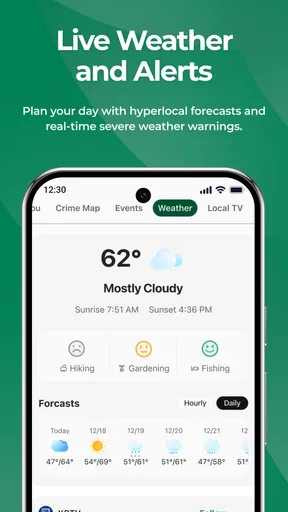
 Analysis by AppCompare
InTown is the kind of news app I would install when national headlines start drowning out the information that actually affects my day. Its focus is narrower and, in my view, more useful for people who want local news, crime alerts, local television information, and nearby events in one place. After spending time with it, my main impression is clear: InTown works best as a local awareness tool, not as a complete replacement for every news source.
That distinction matters. A broad news app is usually better for international stories, business coverage, politics, and major breaking events. InTown has a different purpose. It is aimed at the practical layer of news: what is happening around the community, what may require attention, what local television is covering, and what people can do nearby. For the right reader, that concentration feels refreshing rather than limited.
How InTown fits into a daily news routine
The app comes from LifeAgents and sits in the News & Magazines category. It is free, carries an Everyone content rating, and supports devices running Android 8.0 or later. Those details make it approachable for households that may be using a mixture of newer and older Android phones rather than upgrading everyone at once.
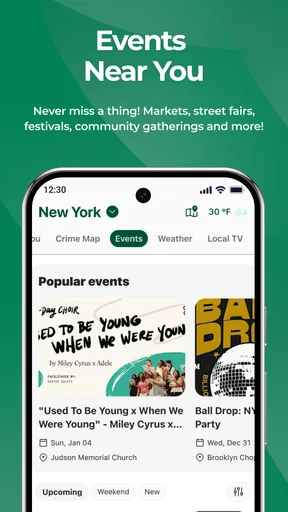
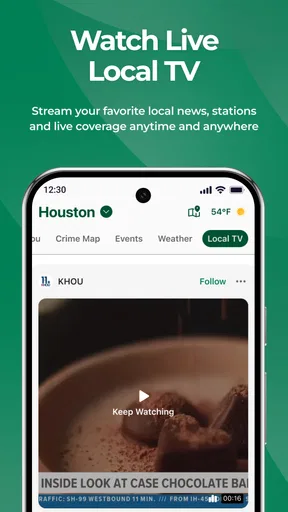
Its store summary points to four connected interests: local news, crime alerts, local TV, and events. I found that combination more meaningful than it might sound at first. These subjects overlap in everyday life, but they are often scattered across separate sources. One service may publish written reports, another may show television schedules, a neighborhood page may discuss safety, and an event site may list activities. Bringing those local concerns together gives InTown a practical identity.
I would not open it expecting the same depth as a newspaper subscription or the broad range of a major international news service. Instead, I would use it as a quick check in the morning, a way to stay aware during the afternoon, and a local reference before making evening plans. That focused role is its strongest argument.
The app has an average rating of 4.6 from around 112 ratings, which suggests that early users generally respond well to its concept. It has also passed 10K installs, so it is not merely an obscure experiment with no visible audience. Those figures do not make the app automatically right for everyone, but they do provide some reassurance that the basic idea has found interested users.
What makes the local focus genuinely useful
The biggest strength is the reduction of effort. When I want to know what is happening close to home, I do not necessarily want to sort through a national feed first. A local-first app can shorten that path. Instead of treating community information as a small section hidden beneath larger headlines, InTown puts local relevance at the center of the experience.
Worth Reading Before You Choose

EA SPORTS FC Mobile 26 Is a Bigger Football Game, but It Takes Time

Flipboard Shows What News Apps Must Do Beyond the Feed

Switching to Android Auto Means Rethinking Your Driving Routine

Google Calendar Makes a Crowded Week Easier to Manage

Ludo King Makes the Most of the Minutes Between Plans

Baby Panda World Brings Quick Play to Modern Phones, but Its Game Library Feels Busy
That is particularly helpful for people who have recently moved. A new resident may not yet know which local channels matter, where community updates appear, or which events are worth watching. InTown can serve as a starting point while that person builds a more complete understanding of the area. It is also useful for residents who have lived in one place for years but have stopped following local sources because keeping up with several separate outlets became too much work.
Crime alerts add another practical dimension. I see them as information to help a person stay aware, not as a reason to constantly refresh the app or treat every alert as a personal emergency. Used sensibly, this kind of local update can help someone think about routes, timing, or general awareness. The trade-off is emotional: safety-related information can become stressful when consumed without context. I recommend checking alerts deliberately instead of allowing them to dominate the entire day.
The local television angle is also more useful than it may appear. Television remains important for many households, especially when people want a familiar local source or prefer watching a report rather than reading a short update. Having local TV information near written news creates a bridge between different habits. Someone who normally checks headlines on a phone can move toward broadcast coverage without searching through several unrelated services.
A realistic way I would use it
Imagine a weekday when I need to leave home after work for an event. Before heading out, I could check InTown for nearby event information, scan local news for anything that might affect the area, and look at crime-related updates with a calm, practical mindset. If local television is covering the same developing story, that gives me another way to follow it later. The value is not one spectacular feature; it is the small amount of friction removed from that routine.
On a weekend, the workflow changes. I might open the app before deciding whether to attend an event, use local coverage to understand what is happening in the community, and then return later for television information. This makes InTown more than a headline reader. It becomes a lightweight local dashboard, provided the information available for my area is relevant and current.
That last condition is important. Local apps live or die by geographic usefulness. An app can have a clean concept, but if its coverage does not match where I live, its value falls quickly. I would therefore judge InTown after a few ordinary days rather than after one enthusiastic first impression. If the local material consistently feels connected to my community, the app earns a place in my routine. If it mostly points me toward places or stories I do not care about, a familiar local news source may serve me better.
Small habits that make the app more useful
My first recommendation is to give the app a specific job. I would not treat it as an endless scrolling feed. Instead, I would open it at predictable moments: once in the morning for awareness, once before travel or plans, and once in the evening if a local story is developing. This approach keeps the local focus helpful without turning it into background noise.
My second tip is to compare an alert with the fuller local story whenever possible. A short crime alert may tell me that something happened, but a longer report or local television segment may provide the context needed to understand timing and location. The alert is useful for attention; it should not automatically be treated as the complete explanation.
A third useful habit is to use the events area as a planning prompt rather than a final decision-maker. I would check the listing, then confirm the details before leaving if the event is important. This is not a criticism unique to InTown. Event information can change, and a local listing is most valuable as a convenient discovery tool. The app helps me notice possibilities that I might otherwise miss, while direct confirmation remains sensible for time-sensitive plans.
Finally, I would use local TV information when a story matters enough to follow beyond a brief update. Written headlines are efficient, but television can offer a different presentation and a stronger sense of local context. InTown’s combination of formats makes it easier to move between quick reading and more deliberate viewing.
Where the experience may fall short
The same focus that makes InTown appealing can also make it feel incomplete. If I want a full news diet, I still need another source for national and international reporting. Readers who prefer one app for everything may find that limitation inconvenient. InTown is better understood as a local layer in a broader routine than as the only place to get news.
There is also a possible tension between speed and context. Crime alerts are valuable when they are timely, but an alert by itself may leave questions unanswered. I would not use the app as the sole basis for making serious decisions about safety, travel, or other urgent situations. For those matters, I would look for fuller reporting and, when appropriate, official guidance.
Another limitation is that local relevance can vary from one community to another. The app’s concept is clearly local, but the usefulness of any local news service depends on whether its coverage reflects the places a reader actually cares about. This is why I would test it against my own routine: do the news items feel nearby, are the events realistically reachable, and does the television information match the channels or coverage I follow?
Readers who dislike switching between different kinds of information may also need an adjustment period. News, alerts, television, and events serve different purposes. Some people will appreciate that variety; others may prefer a highly focused newspaper app or a dedicated event service. InTown’s advantage is its combination, but combination always means the experience may feel less specialized than a single-purpose alternative.
I also would not choose it for deep investigative reading, extensive archives, or a highly personalized national news feed. Those needs call for different tools. InTown’s strength is immediacy and locality, not replacing every form of journalism or planning service.
Who should install it
I think InTown is a strong candidate for people who want to feel more connected to their immediate area without maintaining a long list of local sources. It should appeal to residents who care about community developments, people who want crime-related awareness in a local context, and anyone who regularly looks for nearby events. Families may find the combined approach convenient because different household members can use different parts of the same app.
It may also suit people who have recently relocated. Rather than beginning with a complicated search for every local outlet, a new resident can use InTown to discover the main categories of information that matter in daily community life. From there, they can decide which sources deserve closer attention.
I would be more cautious about recommending it to someone who wants only global headlines, financial news, or long-form reporting. It is also not the best match for a reader who already has a trusted local newspaper app, a television provider with excellent local coverage, and a separate events service that they use consistently. In that situation, InTown may add convenience, but it may not add enough value to justify another routine.
The free price lowers the barrier to trying it, and the Everyone rating makes it suitable for a broad household audience. Still, free does not mean every reader will benefit equally. The real question is whether local information is something I want to check regularly. If the answer is yes, the app has a clear purpose. If I rarely care about nearby news or events, its focused design will feel unnecessary rather than efficient.
Compatibility and what to expect from the current release
The current version is 25.52.16, and the minimum Android requirement is 8.0. For most Android users, that should make installation straightforward, though anyone using an older phone should check compatibility before planning around the app. I appreciate that the supported operating-system range does not force the experience into the newest hardware category alone.
Because InTown is a relatively focused local app, I would pay attention to how it fits my phone habits rather than judging it by the number of features visible at first glance. The useful test is whether I can quickly find something relevant, understand why it matters, and return to my day. If browsing becomes a chore or the information feels too broad for my location, the app is not meeting its central promise for me.
That is also why I would avoid treating the rating as a substitute for personal testing. A 4.6 average is encouraging, but local news preferences are highly personal. The right experience depends on location, interests, and how much I value having several local categories together. I would install it, use it during normal mornings and evenings, and decide based on whether it reduces the time I spend searching elsewhere.
My verdict after weighing the trade-offs
InTown succeeds because it understands a simple problem: local information is important, but it is often inconveniently scattered. By bringing local news, crime alerts, local television, and events into one free app, it offers a practical starting point for staying connected with the community. I especially like the idea of using it as a short daily check rather than an always-open stream.
Its weaknesses are equally clear. It should not be mistaken for a complete news replacement, and alerts should be read with judgment rather than anxiety. The quality of the experience will depend heavily on how well the local coverage matches the reader’s area and expectations. People seeking deep reporting or broad world news will need another option.
For me, that does not undermine the app; it defines it. InTown is worth trying when local awareness is the gap in your current news routine. I would recommend it to a friend who wants nearby updates, safety-related awareness, television coverage, and event discovery without juggling several separate starting points. I would skip it only if my existing sources already handle those needs well or if my main interest lies far beyond local news.
With its free access, broad age suitability, and focused purpose, InTown makes a sensible addition to a local information routine. It is not trying to be everything, and that is precisely why it can be useful. Used as a local companion rather than a universal news replacement, it offers a clear, practical reason to keep it installed.
Pros
- Simple way to discover nearby local businesses and services.
- Useful for finding places that may not appear in major apps.
- Local listings can help support independent businesses.
- Convenient location-based browsing for users on the go.
- A focused interface keeps local information easy to access.
Cons
- Coverage may vary considerably depending on your city or region.
- Some listings may contain outdated hours or business details.
- The app’s usefulness depends on having enough local businesses listed.
- Location access may be required for the best experience.
- Smaller towns may offer fewer results than larger urban areas.
FAQs for InTown
What is InTown and what can I use it for?
InTown is a location-focused app designed to help users discover places, activities, services, and events in their surrounding area. After installing it, you can browse local recommendations, explore nearby options, and potentially find useful information about businesses or attractions. Its usefulness depends on the coverage available in your city, so results may vary by location.
Does InTown require access to my location?
InTown may request location permission to show nearby places and provide more relevant recommendations. You can usually choose whether to allow access while using the app, allow it continuously, or deny permission entirely. If you do not share your location, some discovery features may be less accurate, although other parts of the app may remain available.
Is InTown free to download and use?
InTown can generally be downloaded without an upfront charge, but the exact cost structure may depend on the version available in your region. Some features, listings, bookings, promotions, or services could involve payments or third-party charges. Before confirming any transaction, review the displayed price, applicable fees, and the provider’s cancellation or refund conditions.
Does InTown work in every city or country?
The app’s performance and available content depend heavily on local coverage. In larger cities, you may find more businesses, events, and updated listings, while smaller locations could offer fewer results. Before downloading, check whether InTown supports your area and remember that availability, languages, currencies, and service options may differ between countries.
Is my personal information safe when using InTown?
As with any app that uses location or account features, you should review InTown’s privacy policy before creating an account or granting permissions. Pay attention to how the app handles location data, contact details, device information, and activity history. Use only the permissions you consider necessary, keep the app updated, and avoid sharing sensitive information unnecessarily.


